
Deep Linking
Deep linking use cases
Create seamless journeys across every customer touchpoint.
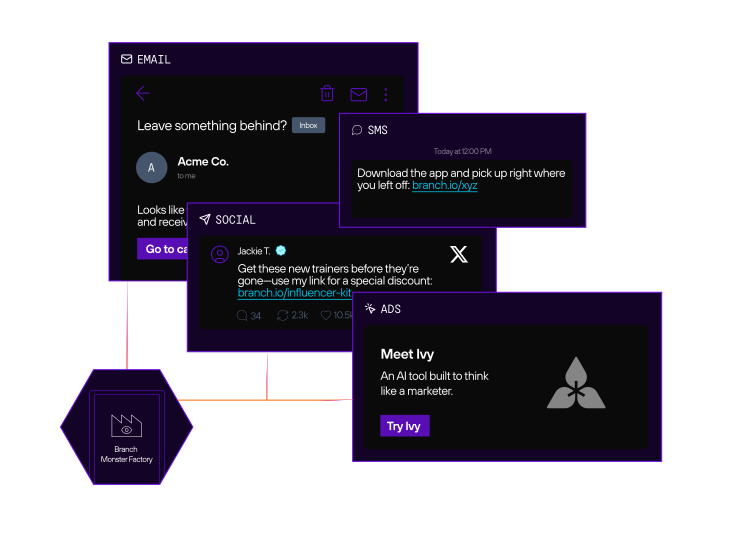
What is deep linking?
Deep linking takes users directly to specific in-app content, like a product page, a promo, or a personalized experience, instead of just launching the app’s homepage.
What is deferred deep linking?
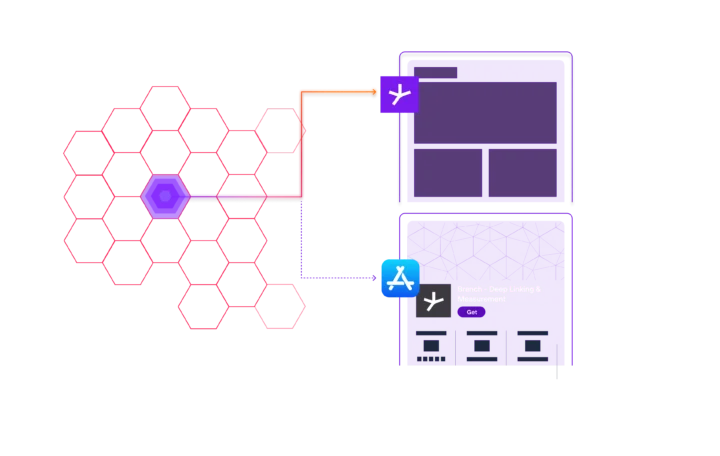
Say a user taps a link in your ad: Deferred deep linking lets you send users to the right in-app content even if they don’t have your app yet.
Here’s how it works:
- If they have the app, the link will route them to the desired in-app content.
- If they don’t have the app, the link will route them to install the app and then — with context still in place — to the desired in-app content.
Why deep linking matters for marketers
Deep linking and deferred deep linking give marketers powerful ways to:
- Shorten the path to conversion
- Increase engagement from ad clicks, emails, SMS, and QR codes
- Deliver personalized, frictionless user experiences
- Maximize ROI with accurate attribution and complete funnel analytics from every deep
- Unify cross-channel campaigns with consistent, trackable links that work everywhere
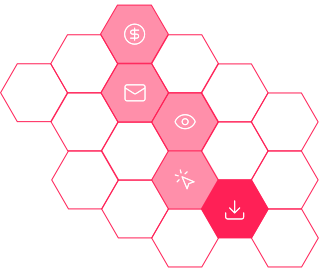
Deep linking is more than getting from A to B. It’s full-funnel growth.
Marketers often think of linking as a simple redirection, but it’s so much more. Branch turns your links into full-funnel growth tools by:

Personalizing post-click experiences based on campaign or audience

Retaining context across installs for smoother onboarding

Powering omnichannel campaigns across email, paid media, social, SMS, and offline

Unifying cross-channel analytics in a single dashboard
Modern marketing needs more than just working links. It needs Branch. Branch deep links are smart, flexible, and built to work across every platform, device, and channel so your campaigns perform and your users have the best experience possible.
Explore what you can do with deep linking
See how leading brands use Branch to solve everyday challenges, optimize their mobile strategies, and create seamless experiences at every touchpoint — no complex workarounds, just results.
Launch and scale a new app
For app marketers launching and growing new apps, Branch offers the infrastructure to move fast and scale efficiently. Teams can quickly set up deep links, QR codes, and robust tracking to enable seamless user journeys from the first touchpoint. Branch automatically routes legacy web links to the correct destinations in the app, preserving valuable traffic and ensuring continuity. Leading brands use Branch to increase engagement and grow their mobile user base by making every link work smarter.
Launching a new app is a high-stakes moment — and Branch helps ensure it starts strong. With infrastructure built for speed, scale, and flexibility, Branch powers seamless journeys from the first touchpoint and supports you in growing your user base with confidence. Leading global brands like PUMA rely on Branch to unify the user experience and ensure every click counts.
“Launching a mobile app is a huge initiative for the company and one our customers have been asking for. In order to deliver the high-quality mobile experience our customers expect, we had to find a technology partner that could guarantee a seamless experience between platforms and the ability to help us identify and grow our user base. Branch is just that partner, and we have been extremely pleased with the results to date.”
Jason Isenberg
Global Head of Digital Consumer Experiences, PUMA
When launching a new app, time is critical. You need deep links, QR codes, and campaign tracking up and running fast — but developer resources are often stretched thin, delaying go-to-market timelines. Branch lets marketing, product, and growth teams create deep links, QR codes, and trackable links without extensive dev support.
“Branch is at the forefront of how we get a user into our app — and our growth would not be nearly what it is today without Branch. Beyond the ease of implementation, we’ve found true partners on the Branch team that work as hard as we do to make sure we’re achieving the goals for our app. Branch is just as invested in our success as we are.”

John Pacino
SVP of Product and Engineering, RADIO.COM/Entercom
Launching or relaunching a mobile app, especially at scale, involves more than just writing code. From managing software development kit (SDK) integration and deep linking setup to aligning with paid media, customer relationship management (CRM) systems, email service providers (ESPs), and analytics platforms, the process can quickly get complex. With Branch, you can accelerate time to launch, unblock internal resource constraints, and ensure you get implementations right the first time.
“I’ve frequently engaged with professional services, which were typically mandatory but unimpressive. However, with Branch, my perception underwent a complete shift. Despite the complexities of our mobile app architecture, Branch navigated the challenges seamlessly.”
Chris Johnston
Senior Marketing Operations Manager, Wave HQ
Acquire more app users
If your goal is to grow your app user base, Branch offers powerful tools to turn every customer touchpoint into an opportunity for acquisition. Whether your audience discovers you through mobile web, QR codes, emails, paid ads, or even smart TV ads, Branch helps you drive high-quality installs with seamless, cross-platform linking and reliable attribution. From converting organic traffic to capturing clicks from creator campaigns, these strategies ensure that no potential user slips through the cracks.
When users interact with your brand on the mobile web, they’re primed to target as potential app users. But getting them into your app isn’t always easy. With Branch smart banners, you can strategically target mobile web visitors with personalized banners and interstitials that route them from your desktop or mobile site, through the app store, and back to the desired content within your app for a personalized experience that eliminates drop-off.
“Branch’s solutions have been instrumental in driving our mobile app growth. By switching to dynamic, incentive-based smart banners, we’ve not only increased our app installs but also grown our app revenue significantly. And, the access to real-time app analytics and attribution data through the Branch Dashboard has helped us make quick, data-backed decisions. We’re excited to explore additional ways to grow our app with Branch.”
Shahzeen Rizvi
Digital Marketing Manager, Omnichannel MENA, Landmark Group
Offline channels offer a significant opportunity for app acquisition. For users who don’t already have your app installed, you can use your QR code campaign as an acquisition opportunity. The Branch links behind QR codes detect if a user has your app or not and then route them appropriately. Deep links also detect whether users are on iOS or Android, then send them to the appropriate app store.
“Leveraging Branch — especially across channels and platforms — provides real-time actionable information. We’re able to see if our campaigns are exceeding expectations and can make adjustments dynamically without disrupting the campaign or tracking. Branch helps me see what success looks like. I deep link everything!”
Nicolette Magbuhat
Loyalty and Growth Marketing Associate Manager, Peet's Coffee
Branch gives you full-funnel attribution and deep linking that works seamlessly across all paid channels, including self-attributing networks (SANs) like Meta, Google, and TikTok. Whether you’re running broad awareness campaigns or precision-targeted promos, Branch ensures every click leads to a seamless, measurable experience — with clear insight into what’s driving ROI.
“Branch lets us deliver personalized experiences to our customers with the right promo at the right time and with the right spend via multiple channels and respective attributions. This is truly crucial for us and our goals of establishing the Domino’s Indonesia app as the go-to for customers.”
Harneet Singh
CEO, Domino’s Pizza Indonesia
SMS and push notifications are powerful, but only if you can tie them to actual outcomes. Branch’s short, smart links save costs and increase click-through rates (CTRs) while reliably taking users to the right content on the web or in the app. With Branch deep linking, you can turn every link in your owned messaging channels into a direct, measurable path to your app, helping you understand not just clicks, but installs, engagement, and revenue. Unify mobile marketing and get granular attribution across push and text channels to see how downloads and in-app actions drive real business results.
“Our partnership with Branch has been a game-changer for Jersey Mike’s. With their insights, we’ve gained a deeper understanding of our customer journey, attributing revenue to specific channels like push and text messages. Branch has not only improved our overall customer experience but also helped us connect the dots between downloads, sales, and our digital marketing efforts, paving the way for a more successful and streamlined strategy.”
Kelly McGee
Director of Digital Marketing, Jersey Mike's
TV ads capture attention, but without a clear next step, that attention can vanish. Branch turns passive viewership into measurable action by powering QR code campaigns that route users directly from the screen to the app, with context intact and conversions tracked. Turning traditional broadcast media into a fully interactive, attributable channel results in app installs and a dramatic lift in viewer engagement.
“Implementing Branch links revolutionized our approach to engaging viewers across multiple channels. They seamlessly guided our audience from TV screens to our mobile apps, creating a bridge between our content and our viewers’ fingertips. The interactive prompts and CTAs not only boosted app installs but also transformed passive viewers into active participants, significantly amplifying our engagement.”
Christoph Bock
Channel Lead, RTLZWEI
Your users are discovering your brand in more places than ever: on Instagram, TikTok, YouTube, affiliate blogs, and beyond. But if you’re not linking properly, you’re flying blind. Branch links turn every creator and affiliate touchpoint into a measurable, conversion-ready funnel with full attribution and dynamic routing. Whether a user taps from a swipe-up, a bio link, or a creator landing page, Branch ensures they land in the right app experience and that you can prove what worked.

Turn your users into advocates with Branch share sheets, which let user share your app, content, or referral codes directly from within the app. Each share generates a Branch link that preserves context — so when new users tap, they’re taken to the right content or onboarding flow, even after install. Whether you’re running a referral program or encouraging organic sharing, Branch ensures a seamless, trackable experience that drives higher conversion, retention, and lifetime value (LTV).
Branch deep linking has transformed how Anghami handles peer-to-peer sharing. Each Branch link is embedded with detailed parameters, making it easy for Anghami to track who shared content and who received it. This data provides valuable insights into which users drive the most sign-ups and how social sharing impacts new user acquisition. Unlike standard share sheets, Branch links offer rich insights, showing not just which links were clicked but also what actions followed. This level of detail helps Anghami identify and reward highly engaged users.
Timing matters, especially when it comes to asking users to download your app. Instead of relying on generic prompts, Branch lets you surface smart, contextual calls to action (CTAs) at exactly the right moment in the user journey. Whether someone’s checking out, exploring a feature, or viewing a personalized offer, you can trigger download prompts that align with their intent. This approach doesn’t just boost installs, it improves install quality by reaching users when they’re most primed to act.
“I was surprised by how much impact a well-placed app download prompt could have. By telling buyers what they could get in the app when it was relevant to them, we were able to drive incredible growth in app downloads. Branch made it easy to put those prompts in the right places.”
Dolff Hanke
Senior Product Manager, Etsy
Email isn’t just for engagement — it can be a powerful driver of app installs. With Branch, you can turn every email into an acquisition opportunity, whether through evergreen CTAs or smart redirects that guide users without the app to the right app store. Branch links create a seamless, cross-platform experience that drives more installs and preserves context from click to in-app action, giving you the data you need to optimize every campaign.
“Working with Branch has been a great experience as we integrate their services into our app and deep linked emails. They are responsive and extremely helpful in addressing any issues that arise.”
Brandon Winter
Marketing Production Manager, Ancestry®
Organic search is one of the most cost-effective ways to acquire new users, but most search engine optimization (SEO) traffic lands on the mobile web and never makes it into your app. Branch solves this with deep linking and SEO-aware routing that turns mobile web visits into app installs and reengagements. Whether users discover your content via Google or another search engine, Branch ensures they land in the app when it matters most — preserving attribution and improving conversions from high-intent organic traffic.
“If improving that [user] experience means you have to enable deep linking to go into the app, just do it. At the end of the day, someone is looking to buy a product — they’ll land on your website or your app and buy it. That’s the task complete. Google will see that as a reward.”
Alexandre Bram
Head of SEO, Boohoo
Improve app onboarding
A smooth, personalized onboarding experience is key to turning new app installs into loyal users. Branch helps ensure that users land in the right place every time — whether they have the app installed or not — and that valuable context from referral or marketing campaigns isn’t lost along the way. By guiding users directly into the most relevant content or features based on their location, behavior, or source, Branch accelerates time to value and removes friction from the first app experience.
Guide new users to the right place after install with deep links that deliver personalized content or app experiences. Branch ensures that every user lands on the most relevant screen, accelerating time to value and improving retention from the very first session while maintaining full context across the user journey.

Branch links retain and pass campaign or referral data through the entire install process, so when a new user taps a referral link, installs the app, and opens it for the first time, they’re greeted with the right content, offer, or onboarding flow. No lost context — just a smooth, personalized experience that boosts conversions and referrals.
During one of GoMechanic’s busiest months of the year, referred users made up the highest ratio of successfully installed users based on GoMechanic’s eligibility criteria — 50% higher than average. They also demonstrated the highest rate of first payments — 33% higher than average.
Privacy tools like Private Relay and the broader shift away from identifiers for advertisers (IDFAs) make it harder for traditional attribution tools to maintain context. Branch takes a privacy-first approach, using direct matching when possible and falling back to Predictive Aggregated Measurement (PAM) when identifiers aren’t available. PAM delivers timely, modeled attribution insights — without compromising user privacy — so your deep links still work and you can confidently optimize campaigns, even in restricted environments.

Branch ensures users reach the right content — even if they don’t have the app installed — by intelligently routing them through the app store and back to the intended destination post-install. This seamless deferred deep linking experience removes friction from the user journey, increases conversion rates, and ensures consistent engagement across every platform and device.
“The problem of the app not (being) installed and assisting the customer to come back was taken care of by deep links. So we used it for app install campaigns, retargeting, and also engaging in services to bring the customer back on the platform. This helped with our store deep links, with our service branches. We’ve got gaming in the app now to target different cohorts of customer(s).”
Ravinder Bhamra
Program Manager of Digital Platform, Bajaj Finserv
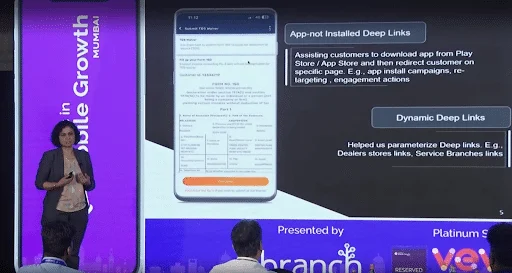
Branch links send users straight into high-impact app flows, such as onboarding, promotions, or personalized content. By eliminating unnecessary steps and reducing friction, users reach meaningful in-app moments faster, which boosts engagement, retention, and overall user satisfaction from the very first session.
“I partnered with a leading streaming platform that took an innovative approach to drastically reduce onboarding time for customers at cruising altitude. They utilized our smart banners, combined with our auto-login feature to streamline the customer journey in collaboration with a leading partner airline. I knew the impact of our partnership when the VP of product management for monetization shared that the onboarding time went from about five minutes to about a minute.”
Jason Presley
Account Manager, Branch
By dynamically routing users to the most relevant content or app flows, Branch helps you deliver a more personalized and language-appropriate experience — improving engagement, retention, and the effectiveness of your global campaigns from the very first app open. Geotargeting and the Branch Web SDK also let you localize banner messaging and tailor onboarding experiences by region or language preference.
Make it effortless for users to engage by sending them directly to the right in-app experience or opening a prefilled text message or email ready to send — no extra typing or steps required. With Branch, you can generate links or QR codes that deliver seamless, one-tap navigation from emails, SMS, or other channels straight into your app or messaging platform. This frictionless approach boosts opt-ins, accelerates conversions, and improves response rates across channels.
“One telecom partner added Branch links in their ‘Verify your account’ email, creating a direct path from inbox to app. Now users tap once and land in the app with their account verified. It’s a seamless UX for users.”
Noel Morris
Senior Account Manager, Branch
Logins are one of the biggest friction points in the user journey — especially after install. Whether it’s from an email, the web, SMS, or a push campaign, Branch links carry the right credentials and route users to the right screen — instantly and securely. That means less drop-off, smoother onboarding, and more returning users who never get stuck at the sign-in screen.
“Branch has transformed our approach to user journeys and attribution. The deep linking integration has not only streamlined the user experience across devices but also delivered the actionable insights needed for data-driven decision-making.”
Mohammed Ogaily
VP Product, Anghami/OSN+
Create cohesive experiences across multiple apps
Managing multiple apps or brands requires a unified and seamless user experience that keeps users engaged no matter where they start. Branch enables you to redirect legacy links to new destinations without losing valuable traffic, while also offering flexible link routing customized by brand, app, region, or user segment. With support for shared measurement and routing across multi-app or multi-brand environments, Branch ensures consistent attribution and insights. Even when full web infrastructure isn’t available, hosted app previews provide a smooth, cohesive experience that connects your entire ecosystem effortlessly.
With Branch, you can update where your existing links lead so if a promotion ends or changes, you don’t lose traffic. Instead of creating new links, simply redirect users to a new offer or page without any extra work. You can also set links to expire so they automatically send users to a fallback URL like a product page or waitlist once the original campaign ends.
New Look, together with Branch, created 400+ unique QR codes. The company then placed these QR codes in its physical stores at point of sale (POS). Within the campaign’s first month alone, New Look drove 16K+ installs.
Whether you’re managing multiple apps, running localized campaigns, or personalizing for specific segments, Branch gives you precise control over how each link behaves. Deliver tailored experiences that drive engagement and conversions, like routing users to region-specific content or country-specific pricing, all without extra engineering effort.
“After proving the value of personalized QR codes, two leading global hotel brands I support are expanding their rollout of our QR code functionality to create smart, dynamic QR codes to drive cross-property promotion, so you can scan the QR code to learn more and book your next stay during the current one.”
Ashley Wong
Senior Account Manager, Branch
Whether you’re promoting across apps or managing multiple brands, Branch ensures consistent attribution, seamless navigation, and accurate insights across your entire digital ecosystem, giving you unified visibility into performance while maintaining flexible control over user journeys.
“Many enterprises grapple with the challenge of seamlessly integrating complementary apps and brands within their ecosystem. The key to success often lies in finding those natural bridge points that connect users across platforms, enhancing their overall experience and maximizing engagement.”
Jesika Dalal
Senior Director of Marketing, EMEA & APAC, Branch
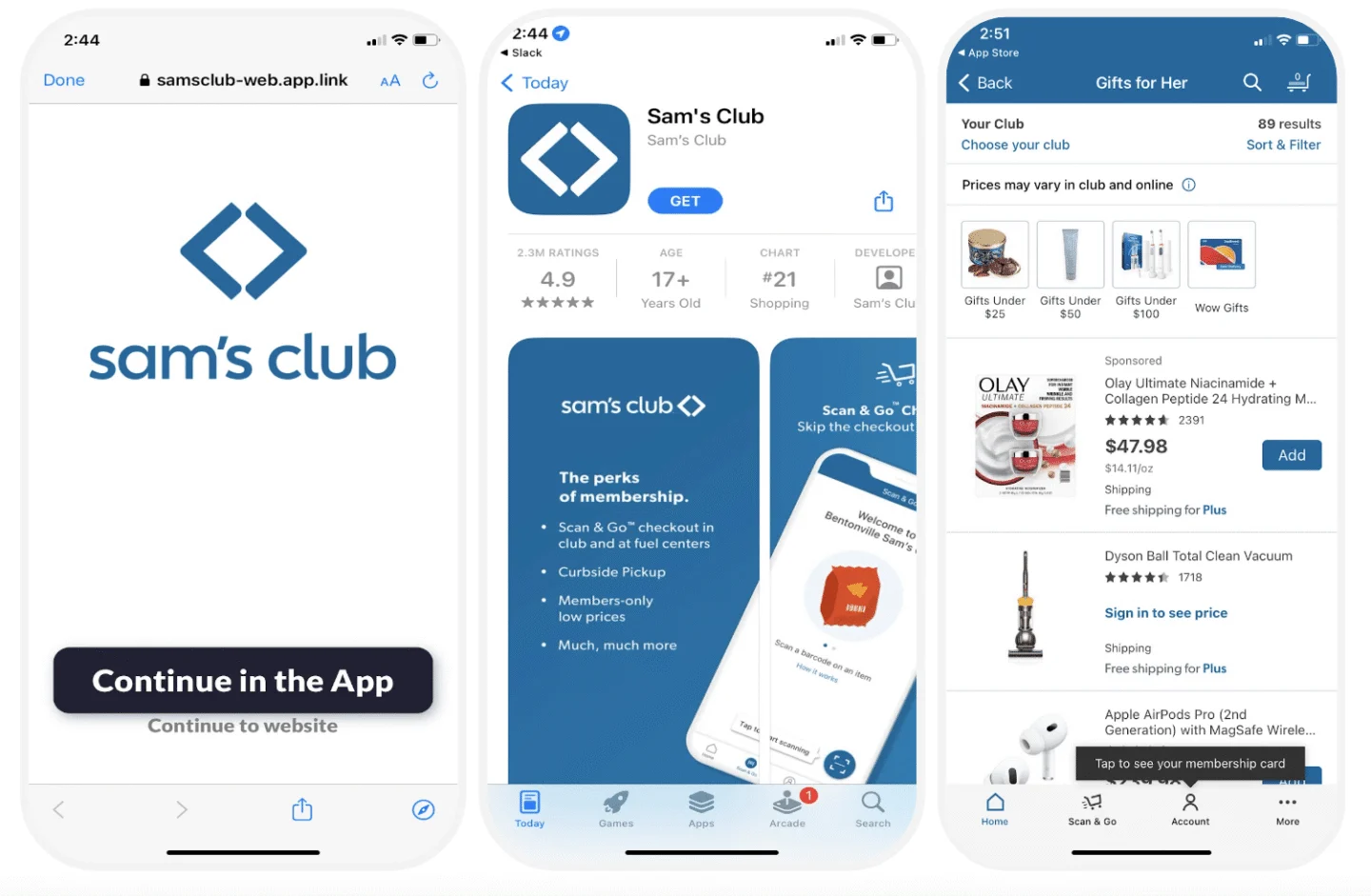
Create lightweight, branded landing pages that preview your app content before an install. These pages help set expectations, reduce drop-offs, and boost conversions by making every link feel intentional, even when linking from channels like SMS, social, or paid ads.
Optimize your omnichannel strategy
When you manage multiple apps or brands, delivering a consistent and connected user experience across all of them is crucial. Branch makes it easy to unify deep linking, routing, and measurement so that no matter where a user starts — whether it’s an old link, a different app, or a specific region — they land in the right place. With flexible configuration options and powerful cross-app capabilities, Branch helps you maintain a seamless user journey and accurate attribution across your entire ecosystem.
Branch links work reliably across iOS, Android, web, and desktop — automatically adapting to each platform without the need for special configuration. This ensures a seamless user experience, regardless of device, to reduce friction and maximize conversions across every channel. With Branch, you can build once and trust your links to perform everywhere.

Seamlessly guide users from web to app with banners and digital touchpoints you can tailor and A/B test. Branch preserves campaign context across devices, so every app install driven by on-site engagement is accurately attributed.
“Working with Branch has been a top-notch experience. It stands out as some of the best technical support I’ve ever encountered when collaborating with another team. The responsiveness is unparalleled — rarely do I have to wait more than a few hours for a response. The most significant impact of Branch’s technology is the direct attribution, allowing us to measure the app install impacts accurately based on user actions taken on our website. It’s a game changer for understanding and optimizing our campaigns.”
Sean Fitzpatrick
Sr. Product Manager, Growth, IMDb
Your users don’t think in silos — and neither should your links. If you’re promoting across multiple apps, services, or business units, Branch connects the dots. Route users intelligently between apps, share attribution context, and deliver a seamless journey that feels cohesive, not cobbled together. One ecosystem, one experience, powered by deep links that know where to go.
“Branch has been a game-changer for us in understanding and optimizing the user journey. Connecting different parts of the user experience — from web to app, subscription management, and sharing — has never been easier. Branch’s deep linking capabilities allow us to see the full picture of user interactions and make data-driven decisions to enhance our service. The insights we gain from Branch links help us address obstacles and create smoother, more enjoyable experiences for our users.”
Mohammed Ogaily
VP Product, Anghami/OSN+
User journeys rarely happen in one sitting or on one screen. Branch preserves context from click to install to reengagement — even when users switch devices or platforms mid-journey. That means more complete data, better attribution, and seamless experiences that keep users moving forward, not starting over.
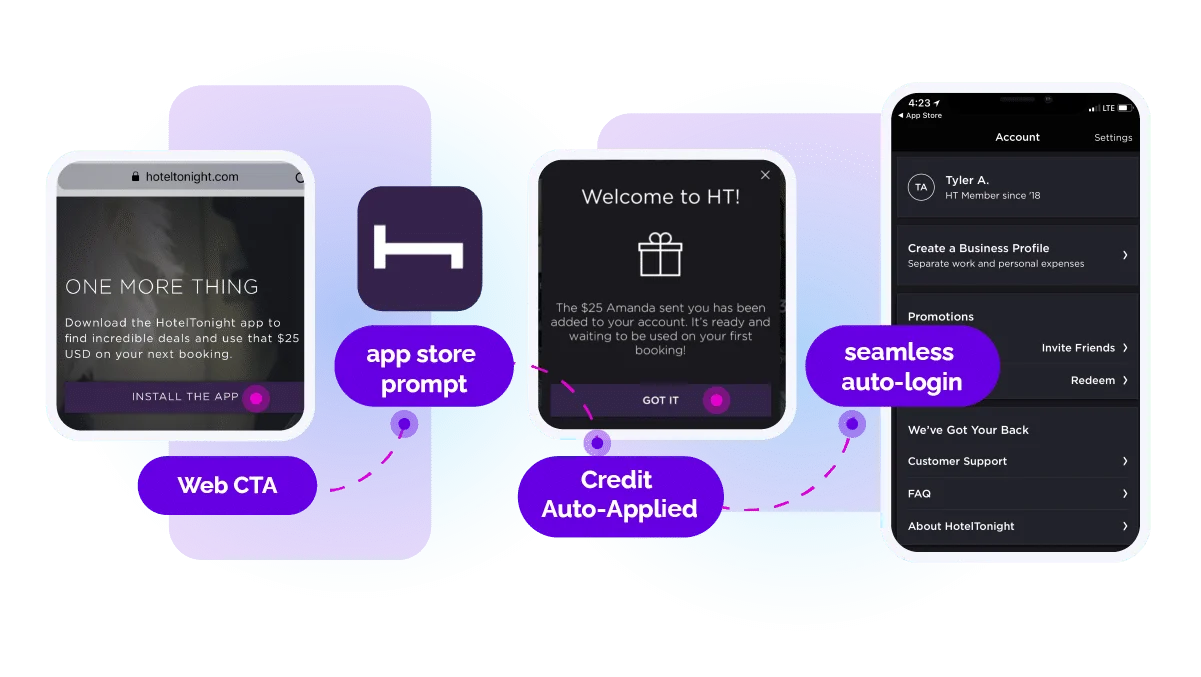
Downtime happens — but your marketing has to keep moving. With Branch, you can instantly redirect traffic from web to app when your site is unavailable, preserving user experience and keeping campaigns live. It’s a built-in safety net that protects performance and revenue, no dev scramble required.
“Journeys banners made it really easy for us to implement a quick solution to redirect traffic from our marketing channels over unexpected site downtime. This allowed us to keep paid channels live, minimizing disruption and performance while creating a smooth user journey that directed to the app.moother, more enjoyable experiences for our users.”
Ellen Hainsworth
Performance Marketing Manager, END.
Reengage users
Reengaging users starts with meeting them where they are and making every return feel personal. Branch empowers you to bring users back into your app with context-rich experiences — whether through QR codes on physical touchpoints or personalized deep links in reengagement campaigns. By remembering where users left off and guiding them seamlessly back into high-value app moments, Branch helps you boost retention and drive continued engagement across channels.
QR codes on product inserts, packaging, or event materials bring users back into your app. With Branch, every QR code is tracked, customizable, and deep linked to specific in-app content — turning offline moments into measurable digital experiences that drive retention and conversions.
“The KFC QR code campaign launched from a pop-up pub was such a success that major U.K. newspapers picked up on its uniqueness and innovation. Influential publications like Business Insider also wrote about the pub, generating free publicity and awareness for the campaign and KFC’s new delivery service. KFC saw an 85% uplift in installs along with over 1,000 scans and opens in the first few days — the strongest results KFC has ever experienced with QR codes. Fast online home delivery via the KFC app is now integral to the KFC app experience in the U.K.”
Whether through email, SMS, or push, Branch links guide users back into the app exactly where they left off — creating a seamless, relevant experience that boosts reengagement, reduces friction, and increases the likelihood of conversion.
“Branch has been at the core of our player experience for over a decade. From seamless passwordless logins to gamified social sharing, Branch links ensure that every interaction — whether through email, social media, or CRM campaigns — drives players straight back into the app. The ability to generate and automate deep links at scale, without unnecessary complexity, has been invaluable for both our team and our players.”
Dominik Go
Managing Director, Platogo
Gamification only works if users land in the right place. Branch deep links route them directly to the right experience — whether it’s a challenge, reward, or leaderboard — preserving context and making every gamified campaign more effective, personalized, and fun.
By leveraging Branch’s Universal Ads, Checkout 51 was able to reengage existing app users, increasing its click-to-open rate from 50% to 93%. This approach turned the company’s strategy to leverage paid ads to reengage users into a cross-platform success, ultimately driving 10% higher conversions within the app.
Optimize your owned channels
Maximizing the impact of your owned channels is essential for driving meaningful engagement and conversions. Branch enables you to seamlessly deep link users from emails, SMS, push notifications, and in-app messages directly into the most relevant parts of your app. By integrating with major email service providers (ESPs) and using customizable smart banners, you can create personalized, targeted experiences that convert mobile web visitors into loyal app users while maintaining consistent brand messaging across every touchpoint.
Turn your emails into high-performance acquisition and engagement engines. Every link in your marketing and transactional emails become seamless paths to in-app content — whether users already have your app or not. No broken journeys, no context lost, just higher conversions and smarter campaigns that work end to end.
“Email marketing has a huge potential to drive business value for us and Branch is helping us unlock that value. We’ve been able to drive a significant increase in revenue and app engagement with Branch’s email solution. And with Branch’s cross-platform data, we have more visibility into user behavior and can send personalized emails based on that behavior.”
Renee Liu
Operation Manager, ZAFUL
Branch integrates natively with the most popular ESPs, including Braze, Iterable, Salesforce Marketing Cloud, Klaviyo, and more. That means you can build and launch deep-linked email campaigns without switching tools, importing lists, or writing custom code. Every Branch link automatically carries context and routes users to the right app experience. Whether you’re testing a new subject line or running a high-volume campaign, Branch keeps your email workflow efficient and your user journeys seamless.
“Deep linking has turned our emails into a powerful channel to drive both app engagement and bottom line results. Branch email powers our best-performing campaigns, driving a 6% click-to-order rate and a 30% app engagement rate.”
Max Mullen
Co-Founder, Instacart
Branch gives you more than click data — it gives you a clear path from message to action. Whether it’s a time-sensitive SMS, a personalized push, or an in-app prompt, Branch links carry full context and route users to the exact right screen, turning engagement into revenue and proving what’s working.
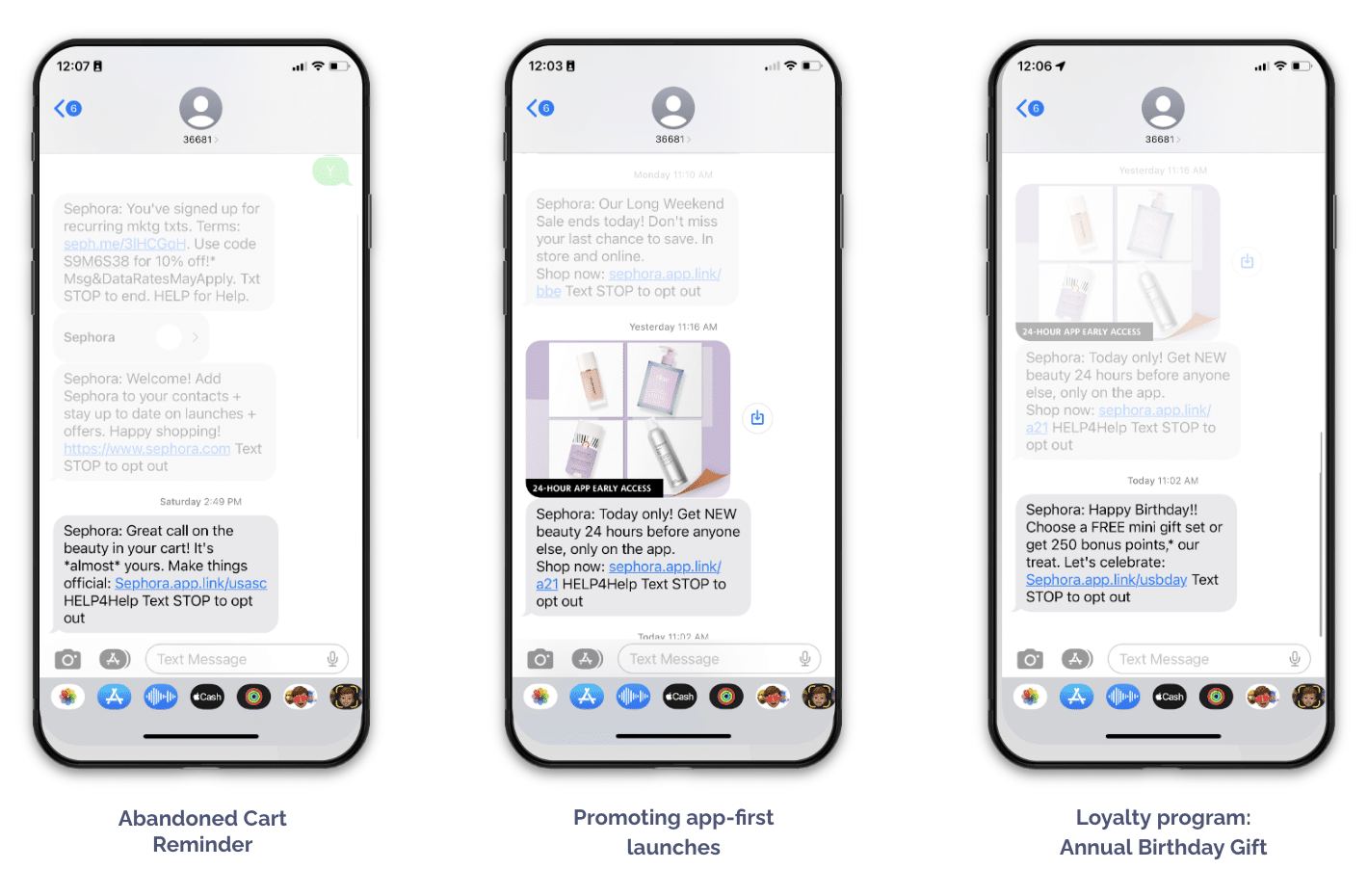
You’re already getting mobile web traffic — turn it into app growth. Branch smart banners convert visitors with personalized prompts that feel native, not pushy. From simple install CTAs to promo-driven interstitials, test, optimize, and scale without dev effort.
“One retail partner was already seeing strong performance from a small banner driving app installs and loyalty sign-ups. But when they tested our third-page interstitials with a $5 promo for users who install and register for an account, installs tripled in a month. That success opened the door to experimenting with more intentional moments of disruption across their web-to-app flow.“
Riley Potts
Associate Account Manager, Branch
Branch banners don’t just look good — they act smart. Customize design and behavior based on user segments, device type, or campaign goals, whether you’re driving installs, promoting offers, or growing loyalty sign-ups.

Create links and QR codes easily
Creating high-quality links and QR codes shouldn’t require engineering support or compromise brand control. Branch makes it easy for marketers and non-technical teams to generate, manage, and customize links and QR codes for any campaign. With features like branded domains, editable social previews, and dynamic QR code destinations, you can launch polished, on-brand experiences quickly. Built-in templates and governance tools also help standardize link creation across teams to ensure consistency and scalability at every stage.
Create, customize, and launch QR code campaigns — no dev help required. With Branch, marketers can generate an unlimited number of branded, trackable QR codes that route users to the mobile web or straight into the app. Whether you’re driving installs from signage, packaging, or events, Branch makes it easy to turn physical touchpoints into digital conversion funnels.
“The QR code campaign was driven by a key business challenge: bridging the gap between offline visibility and online conversion. With increasing footfall in offline spaces (events, stores, billboards), we saw an opportunity to turn high-visibility physical assets into measurable, trackable digital entry points to our e-commerce platforms. Unlike the previous solution, Branch enabled the Max Fashion team to generate an infinite number of customized QR codes. This meant we could track key metrics like click-to-install rates, app opens, and revenue contribution per user.”
Sneha Chaudhary
E-commerce Manager, Max Fashion
Branch puts the power of deep linking and attribution in marketers’ hands. With an intuitive dashboard and preconfigured templates, anyone on your team — from product to CRM — can build high-performing links in just a few clicks. That means less back-and-forth with devs and faster time to market for your campaigns.
“The simplicity of the tool and how easily we can use it, that is really something that sets Branch apart. Even a nonmarketer who does not have experience using an MMP can easily try out Branch’s Dashboard and enable simple links. So let’s say if you want to create a link, that can be simply done by making four steps in the Branch Dashboard.”
Sahil Brahmania
Head of Performance, CARS24
Branded links build trust, increase CTRs, and reinforce your marketing message. With Branch, use your own domain for every deep link and customize slugs to reflect specific campaigns, channels, or offers — creating a consistent, on-brand experience that’s easy to track at a granular level.

Every link is an opportunity to make an impression. Control the images, titles, and descriptions that appear when your links are shared — no engineering required. Create polished, on-brand previews that drive higher CTRs across social, SMS, and email.
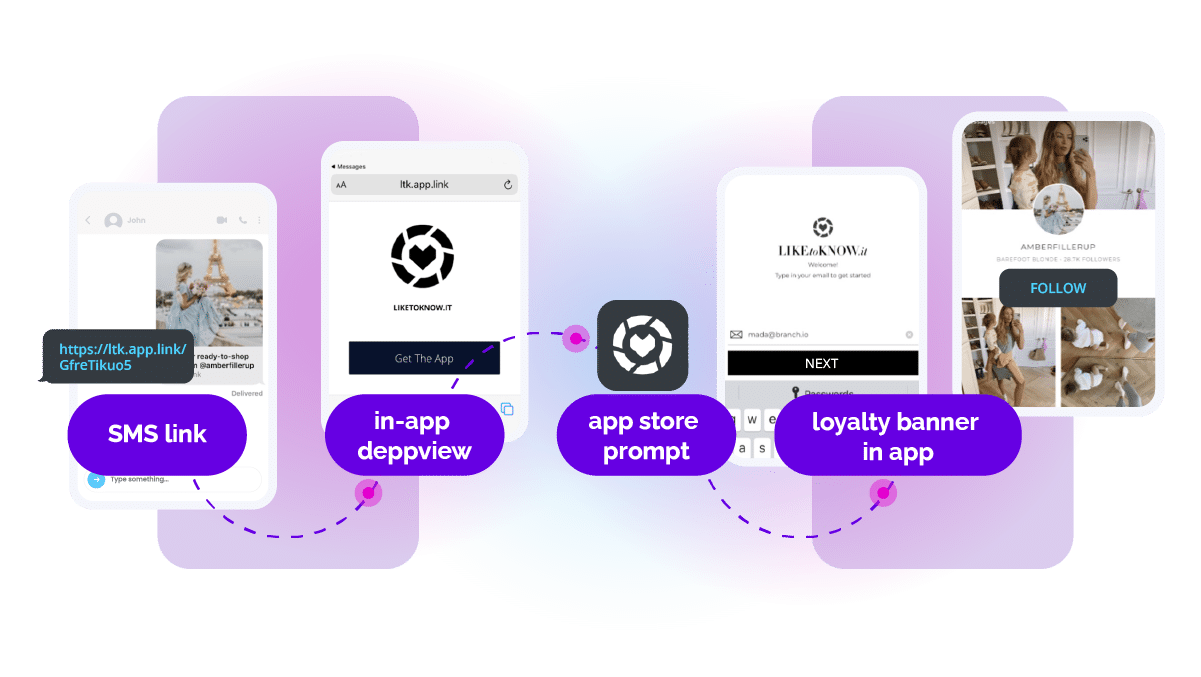
Branch QR codes are fully dynamic — update destinations anytime, even after materials have gone to print. Swap in new offers, extend promotions, or reroute traffic based on performance across product inserts, event badges, or billboards, all without reprints or losing attribution.
“We drink our own champagne when it comes to product at Branch! For our booth presence at MAU we printed QR codes that led to our Activation campaign page on the back of the booth staffs’ T-shirts. Once the campaign ended, we were able to easily switch the link so the QR code redirects to the product page. Easy for us, effective for our audience to get directly to the content they need, and the super cool T-shirts didn’t go to waste!.”
Jordan McMahon
Sr. Director of Marketing Communications, Branch
Scale link creation without sacrificing quality or control. Customizable templates, naming conventions, and approval workflows let your teams move fast while staying consistent — the right balance of flexibility and governance.

Stop waiting on design or dev cycles to update your mobile banners. Fully customize banner appearance, messaging, and targeting — all from a marketer-friendly interface. Tailor experiences by channel, platform, or promo to drive more installs and keep conversion rates climbing.
“Branch accounts for between 10% to 15% of downloads across all our markets in the APAC region, so really significant. But that wasn’t always the case. Back in 2019, we didn’t have Branch. We had a static little banner on our mobile web page trying to convert our mobile web users onto the mobile app. It had a review from the App Store which was there, for some reason, from two years ago. And to actually change that banner would have taken our precious engineering time to try and do that. And it would have taken quite a bit of time to try and do that. Our conversion to driving install was a very measly 0.2%..”
Leon Belobrov
Principal Product Manager of Platform Products, SEEK
Drive users to the app from offline campaigns
Reaching users offline is just as important as engaging them online — and Branch makes it simple to connect the two. With powerful QR code capabilities, you can bridge the gap between physical touchpoints like packaging, signage, direct mail, or events and your app. Whether you’re running a high-volume campaign or creating personalized product experiences, Branch ensures your QR codes are reliable, scannable, and always on-brand.
Turn traditional media into a conversion engine. Branch-powered QR codes bridge the gap between passive viewership and app installs — whether on TV, billboards, or in print. Each scan delivers a seamless path to your app with full attribution and routing that adapts by platform and install status.
“A major media network wanted to drive app downloads and take users directly to the content they were watching on TV. We started with standard QR codes across TV screens and billboards and, after seeing strong results, enhanced the promotions with custom branded QR codes. It’s now a core part of its growth strategy, giving it full attribution and visibility down to the local station level.”
Roaa Elgabrouny
Account Manager, Branch
Your packaging and print materials can do more than look good — they can drive real results. Branch turns every box, bag, insert, or catalog into a gateway to your app with smart QR codes that detect device and install status, routing users to the right app store or in-app experience. Full attribution, real-time insights, and dynamic routing you can update anytime — no reprint required.
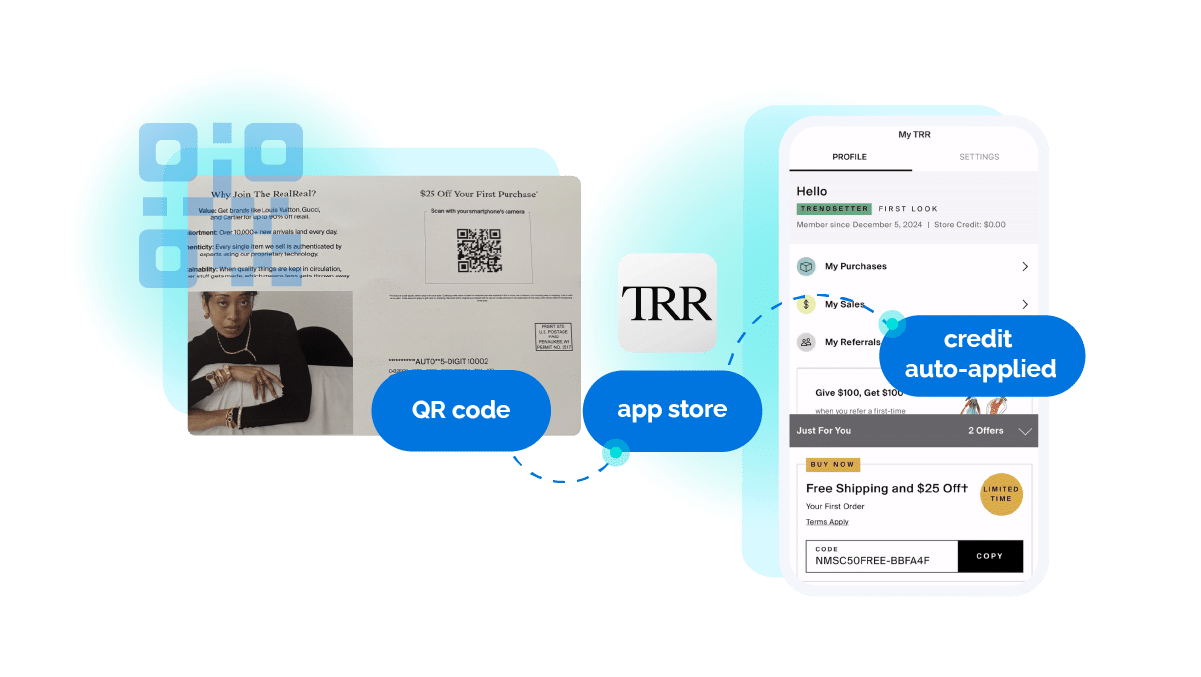
Whether you’re launching 300 or 30,000 QR codes, Branch scales with you. Tie each code to a location, offer, or audience segment for granular insights and the flexibility to optimize on the fly — no degradation, no downtime, no guessing.
“A well-known quick serve restaurant that I work with wanted to increase app usage and loyalty program sign-ups directly in store. We helped it launch over 3,000 unique QR codes using Branch’s custom QR Code API — each tied to a unique location. Now, customers land on the right store page to browse, order, or join the rewards program. The team gets full store-level performance data, plus campaign-wide insights to optimize results.”
Courtney Murray
Team Lead, Account Management, Branch
Make your developers happy
Keeping developers happy means giving them powerful tools without adding unnecessary complexity. Branch streamlines deep linking, attribution, and QR code functionality through a single, easy-to-integrate SDK — eliminating custom routing and fallback logic. Robust APIs, real-time debugging tools, and enterprise-grade reliability support custom workflows while reducing overhead.
Branch simplifies development by combining deep linking, attribution, and QR code functionality into a single, lightweight SDK. This unified solution reduces integration time, eliminates the need for multiple tools, and ensures consistent performance across platforms, giving your team more time to focus on building great user experiences.

Got a complex stack or custom workflow? No problem. Branch offers robust APIs and server-to-server integrations that let you build exactly what you need — from real-time data syncs to advanced routing logic — without compromising speed, stability, or scale.
Branch handles the messy middle so your team doesn’t have to. No brittle code, no endless conditionals — just smart, flexible routing that works across every OS, device, and app state.
“It would have been a lot easier to have just integrated Branch in the beginning.”
Adam Berlinsky-Schine
CTO, Coffee Meets Bagel
Never fly blind again. With Branch’s real-time diagnostics, you get instant visibility into every link, click, and install — plus the tools to identify and resolve issues fast. It’s like X-ray vision for your growth stack.
Enterprise-grade reliability, without the enterprise-grade complexity. Branch delivers world-class performance with 99%+ uptime, robust monitoring, and certifications like SOC 2 Type II and ISO 27001 so your campaigns stay live and your security team sleeps at night.
Branch’s MCP (Model Context Protocol) server is an open-source tool that lets AI agents and developers securely call Branch APIs to create links and take other actions. It acts as a lightweight gateway between your environment and Branch — making the platform AI-compatible and easy to integrate with custom agents.
Make sure your brand is consistent
Maintaining a consistent brand experience across every channel is essential for building trust and recognition. Branch helps you keep your brand front and center by allowing you to use your own domain in every link, whether it’s for social media, SMS, email, or offline campaigns. With customizable slugs, standardized naming conventions, and branded short links, your messaging stays cohesive and professional — no matter who’s creating the links. Plus, you get full visibility into performance, with every click and conversion tracked without sacrificing context.
Every link is a chance to build your brand. With Branch, use your own domain across every deep link, QR code, and campaign — no generic shorteners, no third-party redirects. Branded links boost CTRs, reinforce trust, and keep your brand consistent from first tap to final conversion. Customize slugs to reflect specific campaigns or offers, and every link feels intentional.
Branch’s customizable templates and governance tools keep link structure and naming conventions consistent across every team — reducing errors, improving organization, and making analytics more actionable across departments and channels.
Branch branded short links work seamlessly across social, SMS, and offline channels — reinforcing trust and delivering a consistent experience at every touchpoint. Customize domains and slugs to maintain brand integrity and track performance without sacrificing usability.

Even in environments without web fallback — QR codes, native apps, and beyond — Branch keeps your branded experience consistent. Control link behavior and appearance across every channel so users always encounter a seamless, on-brand journey regardless of platform or entry point.
Reduce costs
Branch helps you make every user interaction more efficient. By routing users directly into self-service app flows, you cut support and fulfillment costs while improving the experience. Branch also reduces fees from intermediary platforms, boosts paid campaign efficiency with seamless native app journeys, and deflects high-cost interactions from web and call centers — driving higher retention, greater LTV, and lower reacquisition spend.
From the first touch to final action, Branch links carry key attribution data, ensuring accurate insights into user behavior, campaign performance, and ROI. Even across app stores, channels, and devices, you get a complete, transparent view of the customer journey.
“I supported a digital telecommunications company that shifted to a mobile-first strategy with Branch to run a cross-channel seasonal campaign that connected paid ads, SMS, and email into one seamless user journey. With granular insights into performance it scaled fast without sacrificing efficiency or cost.”
Rohit Rajan
Account Manager, Branch
Smart deep links that route users directly to FAQs, order tracking, or account management deflect calls and support tickets — lowering operational costs while improving user satisfaction.
Create direct, trackable links that connect users straight to your app or content — bypassing costly intermediary platforms and reducing reliance on third-party services. Full control over routing and attribution means you retain more value from every interaction and campaign.
“Our goal at Hallow is simple: Help people pray and find peace, especially those who have fallen away or are facing hard times. For our Lent campaign, our biggest of the year, Branch was an exceptional partner in helping reach people when it mattered most”
Evan Laird
Head of Marketing, Hallow
Branch improves conversion rates by guiding users through seamless native app journeys that eliminate friction. Deep linking users directly to in-app content from paid campaigns drives higher engagement and ROI — making every ad dollar work harder.
“We’ve been able to address two major issues effectively. First, Branch’s fraud detection capabilities have significantly reduced fraudulent installs and traffic, resulting in substantial cost savings and a better return on ad spend (ROAS). Second, with the use of Quick Links across all organic channels, we’ve gained clarity on which channels drive the most valuable traffic. This has enabled us to target customers more effectively and invest in the right areas to maximize ROI”
Santhosh Kumar Reddy Thelukuntla
Head of Retention and Business Strategy, Arha Media & Broadcasting Private Limited
Route customers directly to FAQs, account management, or troubleshooting within your app — reducing support volume and operational costs while improving satisfaction and retention. Branch deflects costly web and call center interactions by keeping users in efficient self-service flows.
Branch increases LTV and retention by delivering personalized app experiences that keep users engaged longer. Guiding users directly to relevant content reduces churn and builds loyalty — lowering reacquisition costs and maximizing the long-term value of every customer.
“By leveraging Branch’s custom exports to feed our digital agency’s performance marketing tool, our marketing continues to become more efficient. We’ve looked at the data, and we’ve quickly realized that not only does the Shack App offer our guests a better experience, but their engagement and conversion rates were significantly higher, making mobile web journeys instrumental to driving digital success.”
Shannon Reilly
Senior Manager, Lifecycle Marketing, Shake Shack
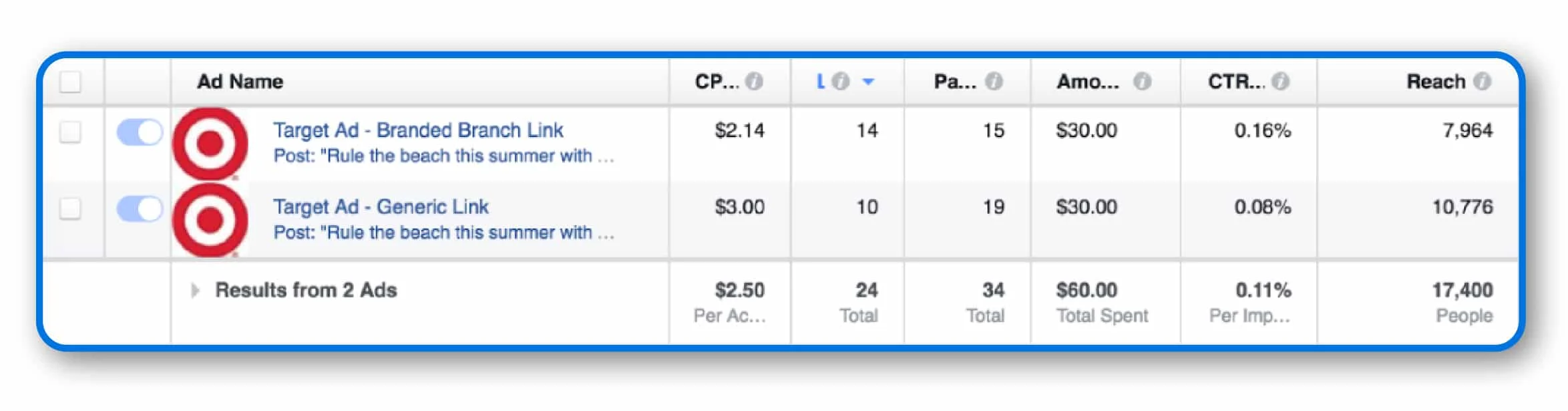
Branded links do more than build trust — they can reduce costs too. For CRM teams paying by the character in SMS or push notifications, shorter links make a measurable difference. With Branch, use your own domain, create custom short slugs, and eliminate bloated redirects or third-party link wrappers — keeping your brand front and center while lowering messaging costs.
Branch tested this with a simple experiment: two identical Facebook ads — same audience, same budget, same content — with one difference. One used a generic link, the other a branded short link. With a preview image, both performed similarly. Without one, the branded link saw double the CTR.
Unify your link infrastructure
Managing links across multiple teams, tools, and channels can get chaotic fast. Branch brings it all together — unifying deep linking and attribution in one platform to eliminate redundancy, reduce complexity, and give you full visibility from discovery to conversion to reengagement. Branch integrates with your ESP, CDP, analytics tools, and data warehouse, making it easy to scale confidently across campaigns and channels.
Fragmented tools lead to fragmented insights. Branch brings everything together — deep linking, attribution, and cross-channel measurement — in one unified platform. Whether a user taps from an ad, email, SMS, or QR code, Branch keeps the journey connected and the data intact. That means you can track what works, cut what doesn’t, and confidently optimize across the full funnel with a single source of truth.
“Branch has become our main source of truth. With the platform’s robust attribution capabilities, we now have the visibility we need to optimize both our paid and organic marketing investments. This transparency allows us to make data-driven decisions that enhance our overall strategy, ensuring we allocate resources effectively and maximize our return on investment.”
Tarmizi Haryono
Head of Growth & Performance Marketing, Tunaiku
Managing deep links, attribution, link shortening, and QR codes across multiple platforms? That’s a recipe for wasted time and inconsistent data. Branch brings it all together in one streamlined solution — no more stitching together tools that don’t talk to each other. From CRM to paid media to offline campaigns, Branch fits right into your stack and gives your team a single source of truth that scales with you.
“If we were working on different tools to run and measure our campaigns, we would run into complications and errors that could result in disjointed customer experience. Using Branch has helped us bridge the gap between user experience and attribution — two critical pieces of a successful marketing campaign.”
Ankur Kulshrestha
Senior Marketing Manager, GoMechanic
Branch integrates seamlessly with any of your ESPs, CDPs, analytics tools, and data warehouses, making it easy to unify data across platforms. This connectivity enables better attribution, personalized marketing, and in-depth insights — helping you optimize campaigns and understand user behavior without complex setups or data silos.

When every team’s running their own campaigns, link chaos can creep in fast. Branch gives you the infrastructure to grow without the growing pains — powering consistent deep linking, attribution, and QR code creation across every region, product, and team. With built-in governance and enterprise-grade reliability, you can move faster, stay aligned, and trust that every link works exactly as intended. Even at scale.
“After reviewing the data, I have a higher level of confidence in its cleanliness. Additionally, we have observed a notable increase in the number of Branch links being created.”
Program Manager
Leading software company
When testing new ad platforms or refining campaign strategies, you need full visibility into how users move from click to conversion. Branch data feeds let you capture raw attribution data and combine it with existing datasets — so you can analyze performance, user behavior, and spend efficiency in one place. Whether you’re optimizing for ROI or building custom dashboards, the flexibility helps you move faster and make smarter decisions.
“Branch is absolutely fundamental to the work we’re doing at Hostelworld to drive app acquisition and engagement, and I wouldn’t be able to do my job successfully without it. Partnering with Branch has allowed us to really elevate our marketing efforts to the next level, and the user-friendly nature of the platform has made a significant impact on our day-to-day operations.”
Jacob Conway
Senior App Marketing Executive, Hostelworld
Keep growing without falling behind on privacy
Branch makes it easier to meet privacy regulations and platform requirements without complex custom work. Out of the box, Branch supports compliance with the General Data Protection Regulation (GDPR), the California Consumer Privacy Act (CCPA), App Tracking Transparency (ATT), SKAdNetwork (SKAN), and more while keeping your team aligned with the latest policy changes from major platforms. With enterprise-grade certifications like SOC 2 Type II and ISO 27001, and support for HIPAA through Business Associate Agreements (BAAs), Branch helps you minimize risk, protect user data, and build trust at scale.
When data is fragmented across platforms, it’s nearly impossible to understand what’s driving growth. Branch delivers a unified view of the customer journey — from first touch to install, in-app engagement, and beyond — so marketers get clear, actionable insights without managing dozens of pixels or reconciling conflicting reports.
“We’ve gone from constantly getting requests to add a new pixel to the app so that we can track something — and data that doesn’t sync to each other, so we don’t understand it and don’t know where the true attribution comes from — to having a simpler path that’s easier for our marketing team to execute over and over again. There’s no overlap in where that spend goes.”
Katie James
Head of Digital, Flybuys
Launch compliant marketing campaigns across global markets without writing custom code for each privacy regulation. Built-in support for GDPR, CCPA, ATT, and more ensures your campaigns meet evolving legal requirements — minimizing risk while maximizing reach and engagement worldwide.
As platforms like iOS tighten restrictions on user-level data, traditional attribution methods fall short. Branch Predictive Aggregated Measurement (PAM) offers a privacy-safe alternative — using predictive models and aggregated attribution to deliver campaign-level insights without relying on device IDs. This gives marketers real-time visibility into performance, helping reduce cost per acquisition (CPA) and optimize spend across paid channels, even in post-IDFA environments.
“We’ve seen impressive results with Branch’s Performance Suite, particularly when it comes to predictive aggregate measurement. We’ve significantly reduced our reportable CPA in just a couple of months. Those types of improvements make a major impact on our business.”
Valissa Warren
Senior Digital Data Analyst, ANZ Plus
For teams navigating complex procurement, legal, and compliance requirements, Branch delivers enterprise-grade security and data privacy. With certifications like SOC 2 Type II and ISO 27001, Branch helps ensure your marketing stack passes the strictest reviews. From GDPR and CCPA compliance to support for Apple’s privacy frameworks like SKAN, Branch empowers brands to stay compliant while optimizing performance.
“We’ve gained invaluable insights into campaign performance by partnering with Branch. Their support in navigating industry changes, particularly SKAdNetwork, has been invaluable to our partnership. It empowers us to make real-time, data-driven decisions to optimize our marketing strategy.”
Mansi Sharma
VP, Brand, Growth & Lifecycle Marketing, MyFitnessPal
For healthcare and wellness brands handling protected health information (PHI), compliance is nonnegotiable. Branch supports HIPAA compliance by offering BAAs to covered entities and their partners. This ensures that organizations can safely use Branch linking and attribution tools while meeting strict regulatory requirements — all without compromising user privacy or campaign performance.
“At Branch, we measure success by our impact on our customers’ ability to grow their businesses. Being the first mobile attribution provider to offer a HIPAA-eligible solution is a testament to the industry-leading partnership and solutions Branch provides that empower our customers to create secure and seamless experiences for their users.”
Paula Mantle
VP of Marketing, Branch
Discover the power of deep linking with Branch’s comprehensive guide. Learn best practices and maximize your mobile growth initiatives.
Route users straight to in-app content with Branch deep links. See code examples for Android, iOS, Flutter, and React Native, plus routing best practices.
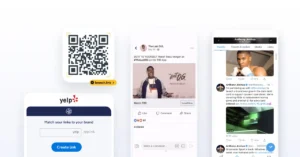
Combining both linking and measurement in one solution makes it easy to create, manage, and track deep links, while also providing reliable attribution for all your marketing campaigns — paid, owned, and earned.